
Screenshots


App details
- Updated
- Oct 11, 2024
- Language
- English,Russian
- Developer
- NCH Software
- Category
- Mobile
SoftPas in:
This product is also available in the following languages:
About Debut Video Capture
Download Debut Video Capture – video capture, screen recorder, webcam recorder, video tutorial, USB device recording, free video software
Overview
Debut Video Capture is a dedicated video recording utility designed for Windows users seeking a reliable solution for capturing video from multiple sources. The app enables users to record from webcams, digital cameras, and other USB-connected devices, making it ideal for content creators, educators, and casual users alike. It also supports on-screen activity recording, which is particularly useful for producing instructional videos, software demonstrations, or sharing gameplay sessions. The application positions itself as a free, all-in-one tool for video capture, offering a straightforward workflow without the need for complex setup or technical expertise.
Target users include students creating study guides, professionals recording training sessions, and individuals documenting personal moments. The app’s versatility allows it to function across educational, professional, and recreational contexts. As a product from NCH Software, a known developer in the utility and media software space, Debut Video Capture benefits from a reputation for accessible, no-frills tools. Although the developer did not provide additional technical details about the app’s architecture or backend processes, its core functionality remains focused on performance, compatibility, and ease of use.
Within the broader productivity and media tools ecosystem, Debut Video Capture fills a niche for lightweight, free software that delivers essential recording capabilities without demanding high system resources. Its ability to handle both external video sources and screen capture makes it a practical choice for users who need flexibility without the overhead of premium software.
Key Features & Functionality
- Multi-Source Video Capture – Supports recording from webcams, digital cameras, and any USB video device. This allows users to capture live footage directly from connected hardware, ideal for vlogs, interviews, or real-time demonstrations.
- On-Screen Recording – Enables full-screen or custom region recording of computer activity. This feature is especially valuable for creating video tutorials, software walkthroughs, or documenting technical issues.
- Intuitive Interface – Automatically detects connected USB devices and presents a clean, straightforward layout. Users can configure recording settings without navigating complex menus, reducing the learning curve.
- Customizable Output Settings – Offers a wide range of video formats including AVI, WMV, ASF, MPG, 3GP, MP4, and MOV. Users can adjust resolution, frame rate, and file size to suit their needs, whether for sharing online or archiving.
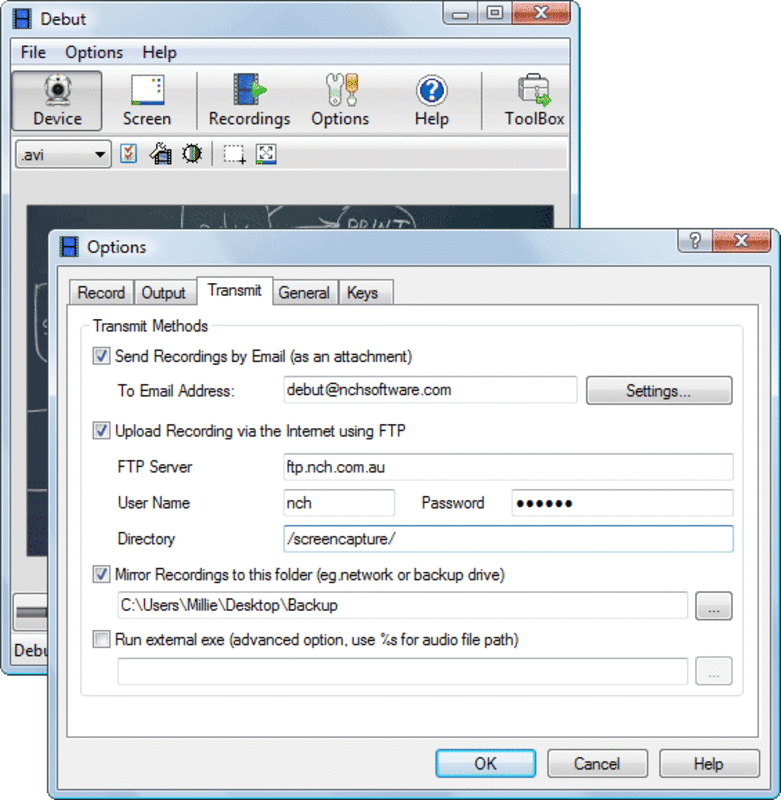
- Hotkey Support and FTP Integration – Allows users to start/stop recordings using customizable hotkeys and supports direct upload to FTP servers, streamlining workflows for automated or remote content delivery.
For example, a teacher can use the on-screen recording feature to create a step-by-step guide for students, while a content creator can capture gameplay from a USB-connected camera and edit it later. The ability to save in multiple formats ensures compatibility across platforms and devices. The inclusion of FTP upload functionality adds value for users managing content distribution without manual file transfers.
Interface, UX & Performance
Debut Video Capture features a minimalistic, task-oriented interface designed to prioritize functionality over visual flair. The main window displays active video sources, recording controls, and output settings in a clean, organized layout. Navigation is linear and intuitive—users can select a source, adjust settings, and begin recording with minimal clicks.
Despite the lack of detailed performance metrics from the developer, the app operates efficiently on standard Windows systems. It maintains responsive controls and stable recording sessions under typical usage conditions. The interface remains fluid even when handling multiple video inputs or high-resolution screen captures. Although the developer did not list formal performance metrics, the app’s lightweight footprint of 17.2 MB suggests optimized resource usage.
Stability during long recordings has not been reported, but the app’s design implies reliability for standard sessions. Users are not required to manage background processes or system permissions, which contributes to a seamless experience. The absence of intrusive ads or in-app purchases enhances the user experience, especially for those seeking a distraction-free recording environment.
Platform Compatibility & Technical Requirements
Debut Video Capture is available exclusively for Windows. The current version is 5.10, released on September 4, 2023. The app’s file size is 17.2 MB, indicating a lightweight installation that does not consume significant storage space. This makes it suitable for older or low-resource systems.
The developer did not specify minimum OS requirements, nor did they list compatibility with specific Windows versions beyond the platform. However, given the app’s lightweight nature and typical design patterns for similar utilities, it is likely compatible with Windows 7 and later. Users should verify system compatibility through official sources before installation.
Although the app is free, it does not include a mobile version or support for iOS, Android, or macOS. Users seeking cross-platform functionality will need to rely on alternative tools. The absence of mobile availability limits accessibility for users who prefer recording on smartphones or tablets.
Pros and Cons
Pros
- Free to download and use with no hidden costs
- Supports multiple video input sources including USB devices and screen
- Lightweight file size (17.2 MB) with minimal system impact
- Offers a variety of output formats for flexible sharing and editing
- Simple, intuitive interface suitable for beginners and intermediate users
Cons
- Only available for Windows; no support for macOS, iOS, or Android
- Developer did not provide detailed system requirements or compatibility information
- Limited customization options beyond format, resolution, and hotkeys
- No built-in video editing features—post-processing required
- Does not support cloud storage integration beyond FTP
FAQ
Is Debut Video Capture safe to download?
Yes, Debut Video Capture is a legitimate software tool developed by NCH Software. It is free from malware and adware, making it safe for users seeking a reliable video capture solution.
Can I use Debut Video Capture on macOS or Android?
No, the app is currently only available for Windows. There is no official version for macOS, iOS, or Android devices.
Does Debut Video Capture require an internet connection?
While the app functions offline, some features like FTP upload require an active internet connection. The core recording functions do not depend on internet access.
How do I update Debut Video Capture?
Updates are typically released through the official NCH Software website. Users should visit the download page to check for the latest version and install it manually.
Can I record my screen and webcam at the same time?
Yes, Debut Video Capture supports simultaneous recording from multiple sources, including screen and webcam, allowing users to create combined video content.
Final Thoughts
Debut Video Capture stands out as a practical, no-cost solution for users needing to record video from USB devices or capture screen activity on Windows. Its clean interface, broad format support, and multi-source recording capabilities make it a strong contender in the free video capture space. While it lacks advanced editing tools and cross-platform availability, its simplicity and reliability deliver consistent results for everyday use.
Those who value straightforward functionality over complex features will find it particularly useful. Educators, content creators, and professionals in need of quick, reliable recordings will benefit most from its ease of use and versatility. The app’s free status further enhances its appeal, offering robust performance without financial commitment.
Download Debut Video Capture now
Guides & Tutorials
How to install Debut Video Capture
- Click the Download button above.
- Once redirected, accept the terms and click Install.
- Wait for the Debut Video Capture download to finish on your device.
How to use Debut Video Capture
This software is primarily used for its core features described above. Open the app after installation to explore its capabilities.
User Reviews
No reviews yet. Be the first to share your experience.
You may also like
more
Que no te pillen¡
About !Que no te pillen¡Reviewed by Jason A. BilbreyShow MoreShow Less

3D Combat Zone
About 3D Combat ZoneOriginally released in 1983, 3D Combat Zone immerses players...

666: El día del portal
About 666: El día del portalOn June 6, 2006, Agent P. Stone uncovers a sinister...

80 in 1 Best Flash games
About 80 in 1 Best Flash games 80 in 1 Best Flash games is a collection of 80 fl...

ABYSS SEEKERーーWhat Do You See Deep in The Abyss
About ABYSS SEEKERーーWhat Do You See Deep in The AbyssIn ABYSS SEEKER, players...

ACA NEOGEO THE KING OF FIGHTERS 2002 for Windows
About ACA NEOGEO THE KING OF FIGHTERS 2002 for WindowsTHE KING OF FIGHTERS 2002,...